
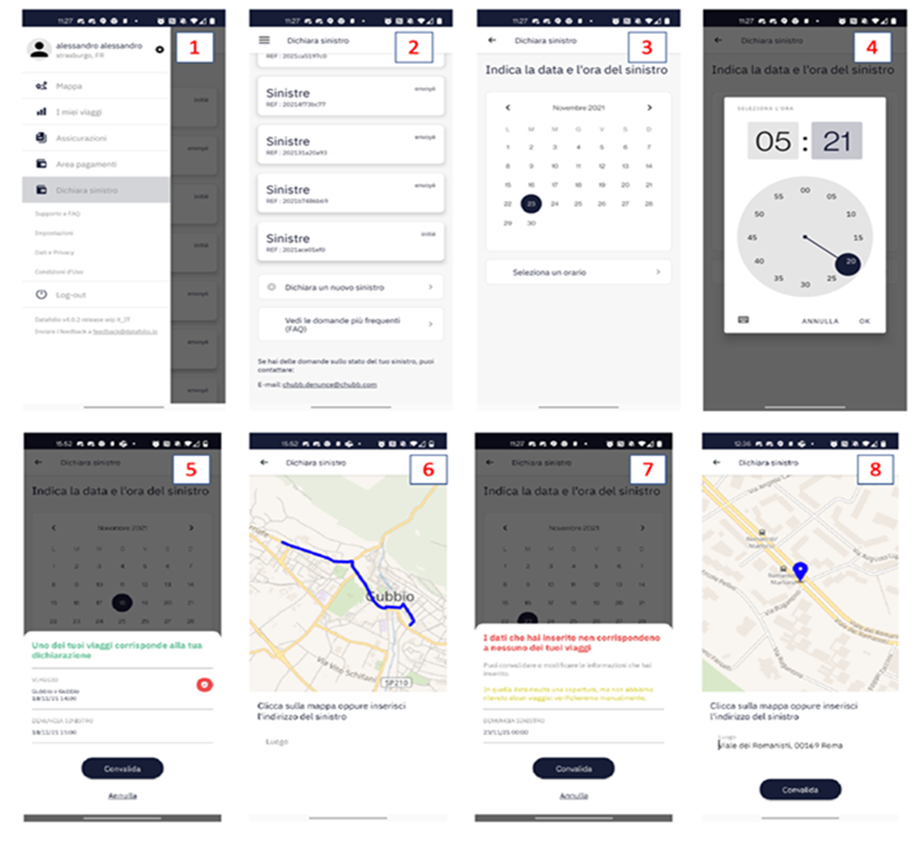
To report a claim, you will have to open the 'Report Claim' window in the settings.
Android
- You will be taken to the 'Report a claim' page where you will find all the claims that have already been registered;
- Report a new claim via the 'Report a claim' button.
- You will also be able to consult the frequently asked questions. Then add the date and time of the claim.
If these match a route already registered by the application, a pop-up will appear where you can match the route you have chosen; you can then indicate the location of the accident directly from the map.
If there is no route registered by the application, you will have to add the address manually.
At this point you should add:
- whether you were a driver or passenger at the time of the accident;
- a brief description of the accident and you will also be able to attach the police report;
- the medical report or other documents relevant to the accident, if you have them.
Finally, if everything went well, your claim will appear on the main screen.
iOS
For IOs mobile phones, simply send the claim report to claims@datafolio.io for assistance.

Comments
0 comments
Please sign in to leave a comment.